Your M3U & Xtream list, on any screen
vzplayer opens the M3U link or Xtream login you already have and turns it into a clean player for live channels, films and series. Use it on a laptop, a phone, a tablet or the big TV in the living room. Nothing to sign up for, nothing to pay.
- Free to start
- Runs in the browser
- Channels, films & series
- Built-in TV guide
- 1On the TV, open the vzplayer app or go to vzplayer.com in its browser.
- 2A 6-digit code appears on the TV.
- 3Type that code and your details below.
Point your phone camera here to open vzplayer on it.
📱 Free Android app for phones, tablets & TV boxes











See it before you install it
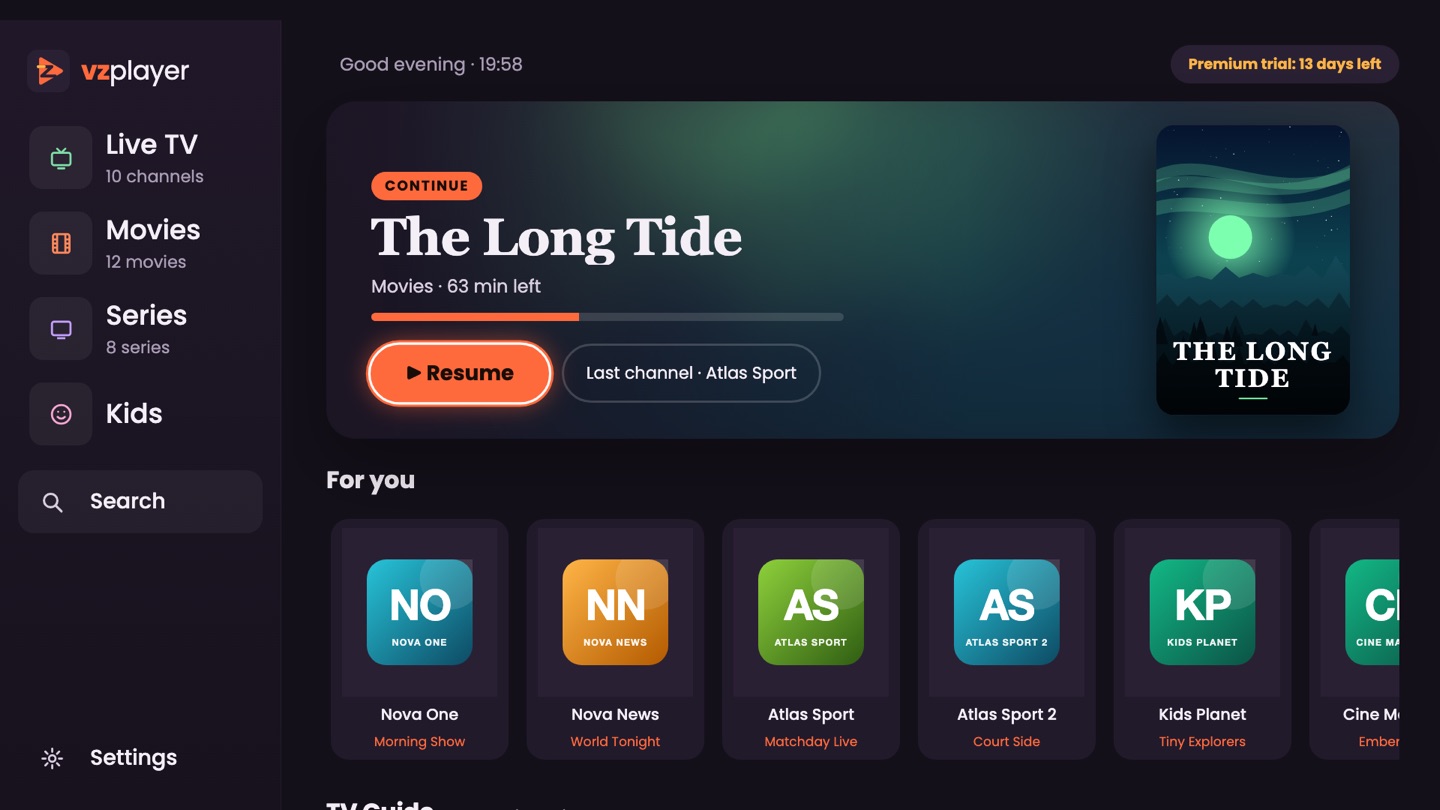
Real screens from the vzplayer app, shown with a demo list.
Made for watching, not for fiddling
The things people use every evening, in one simple player.
Same list everywhere
Start on your phone, carry on in the browser or on the Android TV app. Favourites and progress follow you.
A start screen that knows you
What you were watching, the channels you love and what is on right now, all on the first screen.
TV guide built in
See what is on now and what comes next, and go back to earlier shows when your provider offers it.
Subtitles that just work
Pick your language once and subtitles switch on by themselves. Adjust their size, colour and delay.
A corner for the kids
Only the categories you allow, locked behind a PIN that you choose.
Phone to TV in one step
Enter the short code from the TV on your phone and the list arrives on the big screen. No remote typing.
Small things that make a big difference
- The next episode is offered when one ends
- Save films in the app and watch them offline
- Move channels and categories to the top, hide the ones you never use
- Learns your habits and puts your usual picks first
- Three different video engines in the app for awkward channels
- A lighter mode for slower TV boxes
- More than one list on the same device
- Line check and “Report a problem” right from the TV
- Available in 9 languages, Arabic and Turkish included
- Your password stays on your device, never on our servers
Pick a screen, any screen
A recent browser is all it takes.
- 💻 Windows
- 🍎 macOS
- 🤖 Android phone
- 📱 iPhone & iPad
- 📺 Smart TV browser
- 📦 Android TV box
- 🌐 Chromebook
Up and running in under a minute
No forms, no account, no waiting.
Choose your way in
Use your Xtream login, paste an M3U link or pick an .m3u / .m3u8 file from your device.
Tap “Watch here”
Channels, films and series appear in a few seconds. No sign-up step in between.
Sit back
Browse, search, mark favourites and zap between channels. Add vzplayer to your home screen if you like.
An M3U and Xtream player that lives in your browser
There is nothing to download: vzplayer runs right in the browser tab. You can sign in with your Xtream login (server address, username and password from your provider), paste an M3U or M3U8 link, or choose an .m3u / .m3u8 file of up to 8 MB.
An Xtream login unlocks live channels, films, series and the TV guide (EPG), plus earlier shows when your provider supports catch-up. If a channel refuses to start, switch between HLS and TS in the player and try again.
Any recent browser on Windows, macOS, Chromebook, Android, iPhone, iPad or a Smart TV will do. Your password is kept on your own device, not on our servers. On a TV you can send your details from your phone with a six-digit code.
Rather have an app? Grab the free vzplayer app for Android for phones, tablets and TV boxes, or read the simple guide to put vzplayer on Android TV and Fire TV.
Free to start, Premium when you want more
Every new TV gets 14 days with every feature. After that vzplayer stays free with a few limits.
€22 with crypto, €25 with Paysafecard (its fees). The TV unlocks by itself once the payment is confirmed.
Good to know
Short answers to what people ask us most.
What exactly is vzplayer?
vzplayer is a free player that runs in your browser. You give it your own M3U link or Xtream login and watch on whatever device you have, without installing anything.
How do I open an M3U link?
Go to the “M3U link” tab, paste the link and tap “Watch here”. Have a file instead? Use the “M3U file” tab.
Where do I enter my Xtream details?
In the “Xtream login” tab. Fill in the server address, username and password your provider sent you, and live channels, films, series and the TV guide load right away.
Which formats can I use?
An Xtream login, an M3U or M3U8 link, or an .m3u / .m3u8 file up to 8 MB. Streams play as HLS or TS, and you can switch between the two in the player.
Do I have to install something?
No, the browser is enough on a computer, phone, tablet or Smart TV. You can still add vzplayer to your home screen, or use the free Android app on phones, tablets and TV boxes.
Does vzplayer come with channels?
No. vzplayer is only the player. There are no channels or videos included: the list always comes from your own provider.
Do you keep my login?
No. Your details are only used to open the player and are then removed from our server. If you tick “Keep my details”, they are saved in your own browser only.
A channel will not play. What now?
Most streams use http://. When a channel stays black, the provider’s server may be down or your line may be in use on too many devices. Switching between HLS and TS in the player often helps.
Does it cost anything?
The player is free, with no account. Every new TV gets 14 days with every feature; after that a few extras need Premium: lifetime €22 (€25 with Paysafecard). Nothing renews by itself.